
MacBook
Fixed: MacBook Pro M1 (A2338) Plugged In But Not Charging? The Hidden Culprit
May 2, 2026
karthik
0 views
2 min read
If your MacBook Pro 13-inch M1 (Model A2338) is plugged in but refusing to charge, your first instinct might be to replace the charger, the charging port, or even the battery itself. But what happens when you’ve tried all the standard troubleshooting and your Mac's battery percentage still won't budge?
Often, the root cause isn't a dead battery—it's a breakdown in communication on the logic board.
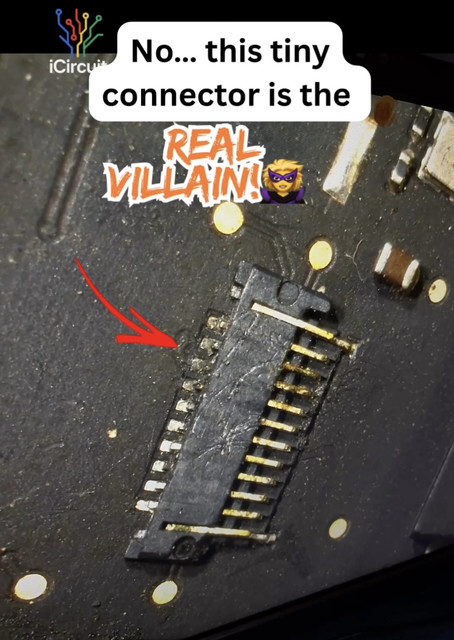
The Diagnosis: Battery Data Cable Connector Damage
Inside your MacBook Pro, the battery doesn't just receive power; it constantly talks to the logic board to report its temperature, health, and current charge level. This communication happens through a tiny, highly delicate component: the battery data cable connector.
If this connector gets damaged—whether from a previous repair attempt, liquid damage, or sheer physical stress—the logic board's power management system loses its connection to the battery.
The result? A safety protocol kicks in. Because the MacBook can no longer read the battery's vital statistics, it completely shuts down the charging circuit to prevent a potential fire hazard or thermal runaway. Your Mac might turn on while plugged in, but the battery will sit at 0% or display a "Not Charging" status.
Why Standard Repair Shops Miss This
Many standard repair shops will misdiagnose this issue. They might quote you for a completely new logic board or charge you for a replacement battery that doesn't fix the underlying problem.
Replacing the battery data cable connector requires highly specialized skills. It is not a "plug-and-play" fix. The damaged connector must be carefully desoldered from the logic board under a microscope, and a new, pristine connector must be micro-soldered precisely into place without melting the surrounding microscopic components.
Our Expert Repair Process
When an A2338 MacBook Pro comes into our lab with a charging failure, we don't guess. We test.
Precision Diagnostics: We measure the SDA and SCL data lines on the logic board to confirm if the battery is actively communicating with the system.
Micro-Soldering: If the connector is physically damaged or corroded, we use state-of-the-art micro-soldering equipment to remove the faulty plastic and metal housing.
Restoration: We solder a brand-new, OEM-spec connector onto the logic board, restoring the vital communication lines.
Testing: We verify the charging current and ensure the battery health data is accurately reading within macOS.
Need Your MacBook Pro A2338 Repaired in Bengaluru?
You don't need an expensive, full logic board replacement just because of one damaged connector.
Operating out of our specialized lab in Marathahalli, iCircuit has been executing these exact complex, chip-level logic board repairs since 2020. We focus on fixing the actual damaged component, saving you both time and money while keeping your original logic board intact.
Don't let a tiny connector cost you a whole new MacBook. 📍 Visit us in Marathahalli, Bengaluru or contact us today to book a diagnostic for your MacBook Pro.